




For most gaming PCs in 2026 the default is DisplayPort. HDMI is the fallback. Casual gaming up to 240Hz on a mainstream monitor works fine either way with HDMI 2.1 or DisplayPort 1.4/2.1, and if that's the setup you're running you can stop reading here. The split starts to matter at the edges. Push into competitive OLED territory at 360Hz or higher and DisplayPort 2.1 wins on bandwidth headroom. Living-room TV gaming is where HDMI stops being optional, since almost no TV ships with a DisplayPort input. The rest of this covers why that split exists and what changes when HDMI 2.2 hardware starts shipping late this year.
Why GPUs only have one HDMI port
It's one of the more common questions we get from new builders. The one-HDMI, three-DisplayPort layout on most modern consumer gaming cards comes down to two things stacked together.
Start with the display controller ceiling. Most consumer GPUs ship with four display controllers, each with its own timing, encoder, and clocking hardware. That's the maximum monitors the card can drive at once. Four is where the design settles because most gamers never plug in a fifth screen, and adding more controllers costs die space, power draw, and design complexity that would push the card price higher without helping anyone.
Then there's what those controllers connect to on the outside of the card. DisplayPort is a royalty-free standard from VESA, so putting three of them on a card costs the manufacturer nothing beyond the physical port. HDMI runs through the HDMI Licensing Administrator, which charges an annual fee plus per-device royalties to any manufacturer using the trademark. One HDMI port covers the buyer who needs it (TV gaming, older monitors) without stacking royalty costs on every card sold. Most gamers only use DisplayPort anyway.
DisplayPort vs HDMI at a glance
The five standards you'll see on current gaming hardware in 2026, and what each one actually delivers before compression enters the picture.
| Standard | Max Bandwidth | Native (no DSC) Capability | Where you find it in 2026 |
|---|---|---|---|
| HDMI 2.1 | 48 Gbps | 4K/120, 1440p/240 | RTX 30/40/50 series, RX 6000/7000/9000 series, most current TVs and monitors |
| HDMI 2.2 (Ultra96) | 96 Gbps | 4K/240 at 12-bit color, up to 16K/60 | Rolling out late 2026, first devices likely AMD UDNA-generation GPUs |
| DisplayPort 1.4 (HBR3) | 32.4 Gbps | 4K/120 with DSC, 1440p/240 | Standard on every gaming GPU 2016 to present |
| DisplayPort 2.1 UHBR 20 | 80 Gbps | 4K/240 native, 8K/60 native | RTX 50 series, RX 9070/9070 XT, high-end 2024+ monitors |
| DisplayPort 2.1b | 80 Gbps | Same as UHBR 20 with updated cable spec | Announced alongside HDMI 2.2, rolling out through 2026 |
The bandwidth headroom that actually matters
A common misread on DisplayPort vs HDMI is that DP lets you skip DSC (Display Stream Compression). Both cables still need it at their bandwidth ceiling. DisplayPort 1.4 needs DSC to hit 360Hz at 3440x1440 with HDR, or 4K above 120Hz. HDMI 2.1 needs it at anything past 4K/120 with high dynamic range.
The real DisplayPort advantage is bandwidth headroom. DP 2.1 UHBR 20 gives you 80 Gbps. That's enough to run 4K at 240Hz native without needing DSC in the mix. HDMI 2.1 tops out at 48 Gbps and needs DSC for the same target. DSC itself is visually lossless in every reasonable test, so if it kicks in you won't see the difference, but a card that doesn't need to compress the signal has more headroom for edge cases like frame-rate spikes, HDR metadata, and future refresh rate bumps.
HDMI 2.2 flips the bandwidth math back in HDMI's favor, which hasn't been the case since DisplayPort 2.0 arrived in 2019. Per Tom's Hardware's coverage of the announcement, the new spec pushes to 96 Gbps with the new Ultra96 cable standard, which exceeds DisplayPort 2.1b's 80 Gbps ceiling. The joint HDMI 2.2 and DisplayPort 2.1b announcement landed earlier in 2025 with both standards tightening cable requirements. Practically nothing ships with HDMI 2.2 support yet, and Tom's Hardware notes AMD's next-gen UDNA GPUs are the likely first adopters late in 2026. If you're buying today, treat HDMI 2.2 as a 2027 concern and pick between DP 2.1 and HDMI 2.1 on the current hardware.
When DisplayPort is the right pick
Pick DisplayPort for any serious gaming monitor use case. That covers 1440p at 240Hz or higher and 4K at 120Hz or higher. Same story for any OLED monitor pushing 360Hz or 480Hz refresh rates. Setups that daisy-chain multiple monitors run on DisplayPort too, since MST is the only way to do that on one cable. G-Sync originally required DisplayPort exclusively before NVIDIA opened up G-Sync Compatible to HDMI 2.1, and DisplayPort remains the smoother path for adaptive-sync on the NVIDIA side. G-Sync and FreeSync both need explicit monitor support to work, so check the panel specs before assuming either is on.
When HDMI is the right pick
The strongest case is gaming on a TV. Nearly every TV ships with HDMI and no DisplayPort, so if your primary display is a 55 or 65 inch OLED in the living room, HDMI is the only choice. HDMI 2.1 handles 4K at 120Hz native on any current console-adjacent PC setup, which is exactly what the LG C-series and Samsung QD-OLED panels are built for.
Older monitors that predate DisplayPort adoption are the other big one. A 2014-vintage 1080p 144Hz gaming monitor may only have HDMI and DVI, and HDMI 1.4 or 2.0 handles that setup without a fuss.
Home-theater setups with a soundbar or AV receiver make the case too. HDMI carries eARC (enhanced Audio Return Channel), which routes audio back from the panel to the receiver on the same cable. DisplayPort carries audio just fine, it just doesn't do the return-channel trick, so anyone doubling a gaming monitor as a movie display with external audio wants HDMI in the pipeline somewhere.
The cable version trap (and how to buy the right one)
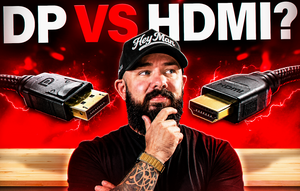
The frustrating part about both standards is that cables don't visually announce their version. A DisplayPort 1.4 cable looks identical to a DisplayPort 2.1 cable, and an HDMI 2.0 cable looks identical to an HDMI 2.1 or Ultra96 cable. Manufacturers often don't print the spec on the cable itself either, which is exactly the trap the video above jokes about.
Two ways to stay out of the wrong-cable trap. Use the cable that ships in the box with your monitor, since panel makers know what spec their monitor needs and include the right one. Unless you're daisy-chaining or extending across a room, the included cable is the safe answer. If you're buying separately, look for the exact certification label on the packaging. HDMI 2.1 cables are certified as "Ultra High Speed HDMI" with a QR code. HDMI 2.2 cables are labeled "Ultra96." DisplayPort 2.1 cables carry UHBR (Ultra High Bit Rate) labels with a tier number, UHBR 10, UHBR 13.5, or UHBR 20 depending on target bandwidth. If the packaging doesn't say any of that, skip it. Our accessories collection stocks the standard cables we ship with builds, and any of them are safe pairings for the monitors we recommend.
FAQ
Is DisplayPort or HDMI better for gaming in 2026?
DisplayPort for most gaming monitor use cases, HDMI for TVs and older monitors. DisplayPort 2.1 UHBR 20 has more bandwidth headroom than HDMI 2.1 for high-refresh 4K and 1440p targets. HDMI 2.2 changes that math when it ships in hardware later in 2026, but today's cards mostly max out at HDMI 2.1 on the HDMI side.
Does DisplayPort or HDMI give higher FPS?
Neither cable increases fps by itself. What they do is enable higher refresh rates at higher resolutions. If your monitor and GPU both support 4K/240Hz and the cable can only carry 4K/120Hz, the monitor caps at 120. The cable is what caps the refresh rate there, not the hardware behind it.
Can I use HDMI for 240Hz gaming?
Yes, on HDMI 2.1. HDMI 2.1 handles 1440p at 240Hz natively and 4K at 240Hz with DSC on. Casual gamers who only need 240Hz or lower can use HDMI 2.1 and DisplayPort interchangeably. Above 240Hz on 1440p, or 4K at high refresh rates, DisplayPort 2.1 gives more headroom.
Why do graphics cards only have one HDMI port?
Because HDMI charges royalties per device to the HDMI Licensing Administrator while DisplayPort is royalty-free. GPU makers also cap display controllers at four to keep die cost and power draw reasonable, and most gamers only use one HDMI port when they use it at all.
Do I need a special cable for my new monitor?
Use the cable that came in the box. It's the right spec for the monitor. If you need to buy one separately, look for the exact certification label. "Ultra High Speed HDMI" for HDMI 2.1, "Ultra96" for HDMI 2.2, and "UHBR 10/13.5/20" for DisplayPort 2.1. Skip anything without those labels on the packaging.
Ready to build
For a gaming monitor, DisplayPort is what you plug in. HDMI belongs in the picture when a TV is the display or an older monitor doesn't offer DP. Every current RTX 50 series and Radeon RX 9070-class GPU ships with DisplayPort 2.1 and HDMI 2.1, which covers gaming spec needs for another year until HDMI 2.2 hardware lands.
Every META PCs system ships with the right cable for the monitor it's paired with, and every ready-to-ship build comes with GPU display outputs configured and tested before it leaves the shop. If you're spec'ing a high-refresh 1440p rig where the DisplayPort 2.1 headroom matters, our Nightwalker v2 (Ryzen 7 7800X3D + RX 9070 XT + 32GB DDR5) is the shop's most popular pick, and the 1440p buying guide walks through the rest of the spec. Once your monitor is plugged in and the refresh rate is right, our free FPS boost guide walks through the settings that squeeze more frames out of it, and the first six things to do guide covers the rest of the setup pass.